
Translated by AI. This article was originally written in French and translated by Claude, Anthropic’s AI. The French original remains the reference version.
In modern gaming, games are getting ever larger, and so are their updates. Every download can quickly saturate an Internet connection, especially when several devices share the same bandwidth.
Take mainstream and AAA games, which easily go past the 100 GB mark!
The bill quickly adds up if, like me :), you have several devices used directly or indirectly for video games. I count four: my desktop PC, the living-room “console” running Bazzite OS, the Steam Deck and, more recently, a mini PC for remote play.
As mentioned in the Open-Source Odyssey series, I chose Steam as my gaming platform because it has offered Linux compatibility for a long time, notably through the Proton compatibility layer.
With the constant downloads and daily updates, I wanted to “rationalize” things, knowing that I download the same thing several times on different devices.
After some research, I came across the self-hosted LanCache service (https://lancache.net/).
I quickly realized that the service is popular at LAN parties (ah, nostalgia…) to cope with 100 PCs downloading the same game over an Internet connection with limited bandwidth.
In this article, we will look at setting up LanCache, which not only speeds up game downloads for your devices, but also saves precious Internet bandwidth.
Project goal: why install a LanCache server?
LanCache is based on a simple idea: store frequently downloaded data, such as games and updates, locally. When a device downloads a game, a copy is stored on the server. Afterwards, if another device, or even the same one, wants to download that game again, the data is fetched locally from the server instead of from the Internet.
The download speed therefore goes from your Internet bandwidth to the speed of your LAN.
I have not made the jump to 10 GbE yet; I am on 2.5 GbE and the results are already impressive.

The benefits:
Bandwidth savings: you reduce the use of your Internet connection by avoiding repeated downloads.
Faster downloads: the local cache is much faster than remote servers, reducing waiting time for installations or updates.
Centralization: all your machines (PCs, consoles, etc.) can connect to the same server, which simplifies management.
The project is especially relevant if you have several gaming devices at home, or if you want to share a cache with friends at LAN parties.
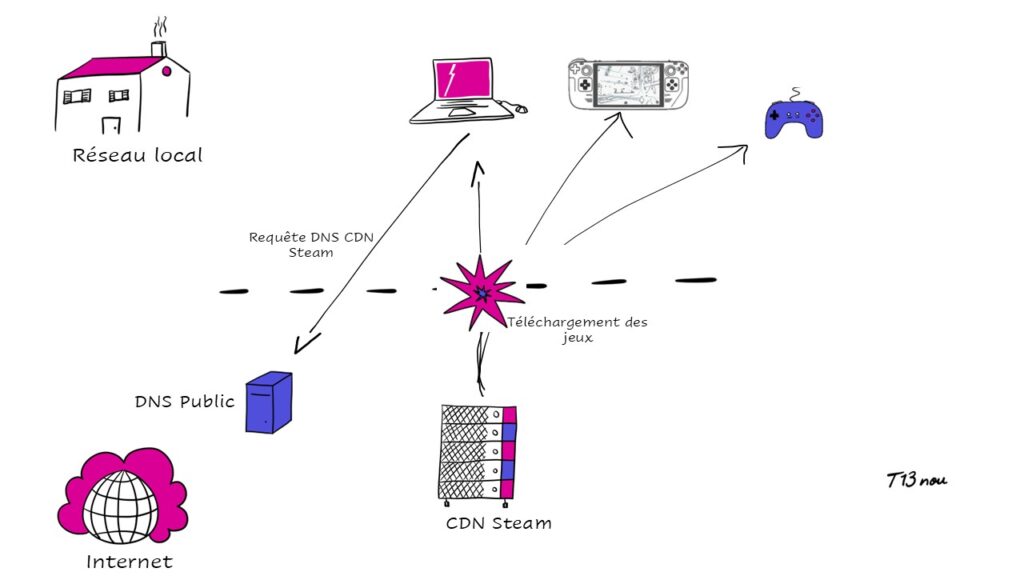
Project architecture: a simple setup with Proxmox and TrueNAS
Looking more closely, the solution has no particularly exotic requirements. Everything can run natively on Linux or in Docker containers.
The only thing to plan for is storage space for the cached data.
But before getting into the details, let’s take two minutes to look at how LanCache works.
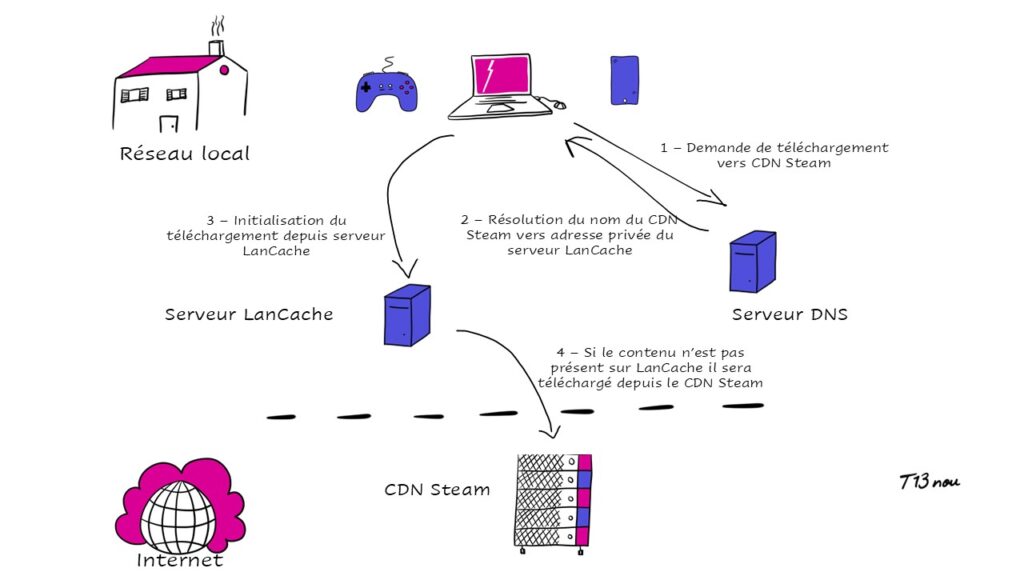
LanCache: proxy and DNS
LanCache is not a revolutionary technology in itself, just a simple proxy server with a cache function. In LanCache’s case, nginx plays the role of proxy/cache.
So how do you connect the proxy/cache server to your Steam client (for example)? Through a simple DNS redirection, which sends all Steam download requests to the LanCache server.
LanCache is made up of several sub-services:
LanCache server, or “monolithic”, which stores your games and saves.
LanCache-DNS, which handles local name resolution for your gaming services (Steam, Origin, etc.)
LanCache-SNI, which, in Origin’s case for example, can handle HTTPS calls from the client to the LanCache server
For DNS, you need to ask yourself: do you already have a private DNS server that can handle “overrides”, that is, name resolutions “forced” by the DNS server’s administrator?
If you already have Pi-hole, Unbound, AdGuard or similar, there is no need to add the LanCache-DNS service. You can manage everything from the “Override” section.
If you do not have a local DNS server,
…then you have several options:
Edit your hosts file locally to map the Steam CDN name to the private address of your LanCache server.
Use LanCache’s DNS server for all your devices, and change your DHCP settings accordingly so that every device receives the address of your LanCache-DNS server
In my opinion, if the second option tempts you, consider Pi-hole instead, for a better-known solution with ad blocking on top.
And if you want to set up a local DNS solution, I can only recommend my article on the subject :)
Hosting the LanCache server
I used a container on my Proxmox node to host LanCache.
A simple LXC container will do, running the right Docker command:
docker run \
  --restart unless-stopped \
  --name lancache \
  -v /cache/data:/data/cache \
  -v /cache/logs:/data/logs \
  -p 80:80 \
  -p 443:443 \
  lancachenet/monolithic:latest
The installation process is detailed here.
If you use your own DNS server, I recommend setting the upstream in the docker run command so you do not loop back to your own DNS server 😊
-e UPSTREAM_DNS="8.8.8.8"
Storage on TrueNAS over iSCSI
To store the cached games and updates, I connected the LanCache container to my TrueNAS server through an iSCSI mount. This provides fast, expandable storage dedicated to LanCache, without filling up the container’s main disk.
iSCSI also offers very good performance and avoids the permission issues I ran into with SMB or NFS mounts.
Why not a local cache on Proxmox? Simply because I do not have enough disk space for the few terabytes of games I want to cache.
And, as I said in my article on decoupling: each server has its own job. TrueNAS does storage, so…
I found a rather interesting video on attaching a remote iSCSI disk to Proxmox.
https://www.youtube.com/watch?v=g5fhCiAETSU&t=605s
In the future, however, I will look into running the LanCache Monolithic service directly in Docker on TrueNAS. That would avoid needless bandwidth use between Proxmox and the iSCSI mount.
Automating prefill with steam-lancache-prefill
Another key part of my architecture is a second container running steam-lancache-prefill. It is designed to automatically preload games and updates into the cache. Rather than waiting for devices to request games, SteamPrefill automatically downloads and updates the games you need, preferably during off-peak hours (such as at night). This way, the cache is always up to date and ready to use.
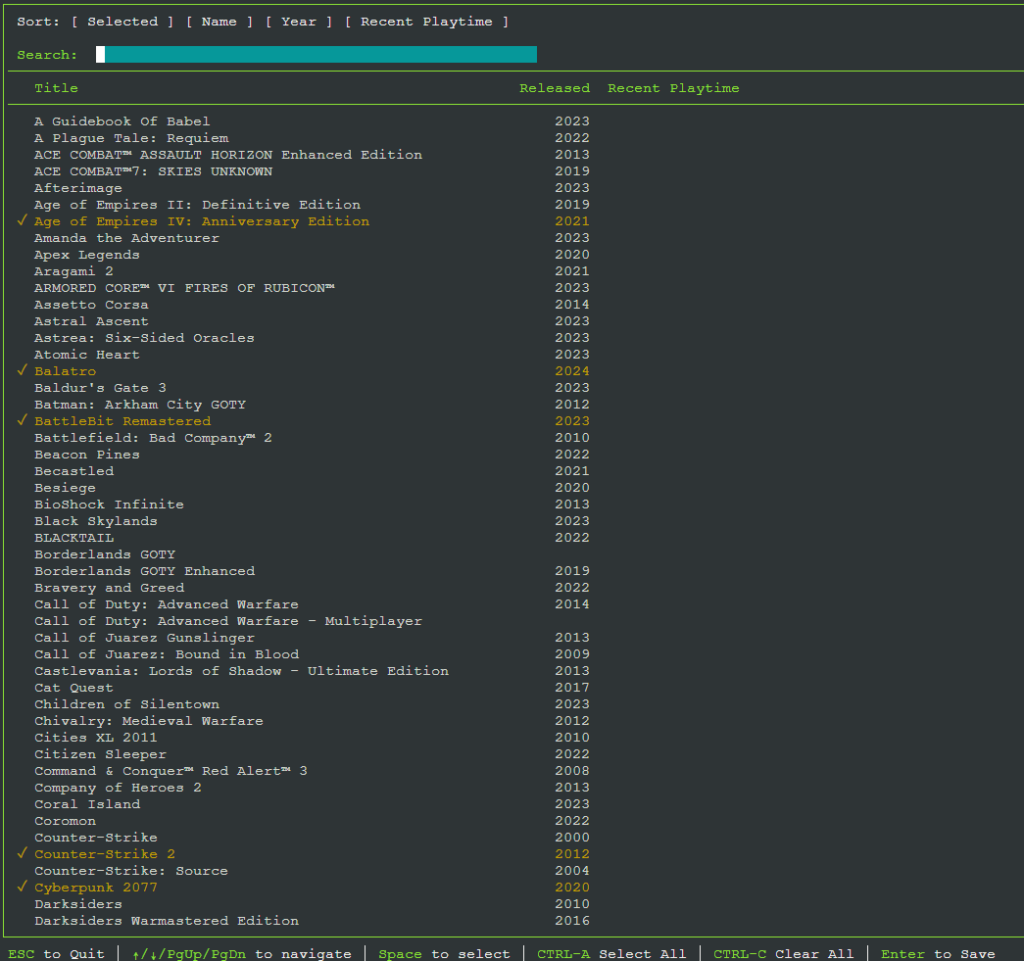
Selecting the games to cache in steam-lancache-prefill
steam-lancache-prefill is available on GitHub and can run on a regular computer or on a server.
I chose to run it on a server because:
The service has to run in the background without me thinking about it
Updates must be downloaded regularly so the cache does not become stale after a few days, which would mean downloading from Steam’s public CDN again.
Once again, a Proxmox LXC container hosts it (Debian in my case).
I recommend installing the service directly in the container rather than using Docker. The reason: scheduling automatic update checks with cron is not available in Docker.
Here is the guide to set up the service on Linux: https://tpill90.github.io/steam-lancache-prefill/install-guides/Linux-Setup-Guide/
And finally, the guide for regularly updating the cache (I check every hour): https://tpill90.github.io/steam-lancache-prefill/install-guides/Scheduled-Job/
Lessons learned
This architecture provides centralized storage management, optimized bandwidth and, above all, a better user experience on every gaming device.
Honestly, once it is set up, I do not think about it and it requires no maintenance.
Just the pleasure of fast local downloads and a freed-up Internet connection 👌