Translated by AI. This article was originally written in French and translated by Claude, Anthropic’s AI. The French original remains the reference version.
Homelabbing is a hobby that keeps growing in popularity. It lets tech enthusiasts test software, learn new and complex technologies, and build personal projects from the comfort of their home. Whether you are an IT professional looking to broaden your skills or a hobbyist eager to explore the world of technology, setting up a homelab is an exciting adventure. Here is a guide to help you plan your homelab effectively.
Define your goals
First of all, it is crucial to decide what you want to achieve with your homelab. Do you want to focus on networking, security, software development, or maybe a mix of everything? Defining clear goals will help you choose the right hardware and software for your lab.
Usually, beyond the learning aspect that is at the heart of homelabbing, there is hosting services and data. Taking this into account radically changes how you approach your homelab. It is no longer just about testing, but about hosting services that work 24/7, with the security and monitoring that go with them.
There are countless resources on the Internet to give you ideas for services you could self-host to help you in everyday life :)
One of my sources of inspiration is a collection of Proxmox scripts that make it easier to set up self-hosted services.
https://tteck.github.io/Proxmox/
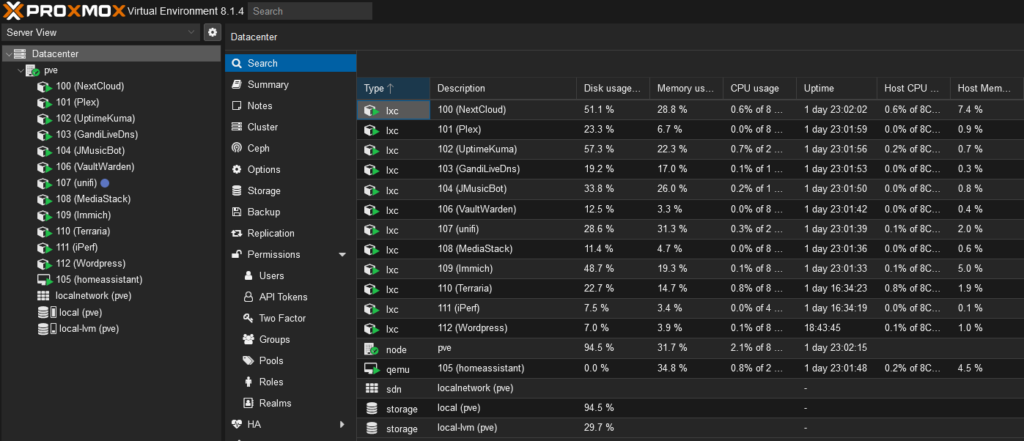
The services I host on my Proxmox hypervisor: Nextcloud, Vaultwarden, Plex…
Budget and space
Consider the space available at home and set a budget. Homelabbing can quickly become expensive, but with careful planning you can optimize your spending. Consider buying second-hand hardware or starting with free software solutions.
Again, this really depends on your goals. For testing, a Raspberry Pi or a simple second-hand NUC can work wonders. You can even run everything on that single machine: a NAS, a router, your VMs (virtual machines) and containers.
If you plan to self-host services accessible 24/7, then you should consider decoupling your infrastructure, for example with:
One server for all your services
One server for DATA
One server for networking
I will soon publish an article on my approach to decoupling. The idea behind it is simple: minimize interdependencies between critical components.
I have already talked about my choices in my “Open-Source Odyssey” series. My choices are simple and robust:
A Protectli VP2420 for networking: OPNsense handles DNS, DHCP, reverse proxy and firewall
A custom NAS running TrueNAS Scale
A “Topton I3-N305 Intel Core” server for my Proxmox hypervisor
Network configuration
An often underestimated but vital part of setting up a homelab is network configuration. A solid understanding of networking concepts will let you build a secure and efficient environment. Think about network segmentation, VLANs and setting up a firewall.
Once again, it depends on the goals you want to achieve.
For example, for self-hosted services, here is what you need to consider:
Buy a domain name to reach your services (from home or from the Internet). Personally, I trusted Gandi.net and bought my domain name for about €200 for 10 years
Generate certificates for that domain name with a free certificate authority such as Let’s Encrypt
Run a reverse proxy (Traefik, Caddy, HAProxy, Nginx Proxy Manager) to route incoming traffic to the right self-hosted service. The reverse proxy can also associate the domain name with the right certificate so that traffic is encrypted with SSL
Configure split DNS to access your services internally through the domain name
Have a service that updates your public IP on your domain name. For this, I use a small Docker container called gandi-livedns
It may sound complicated, but it is usually “set and forget” :) These are operations you do once and that will not require much maintenance afterwards.
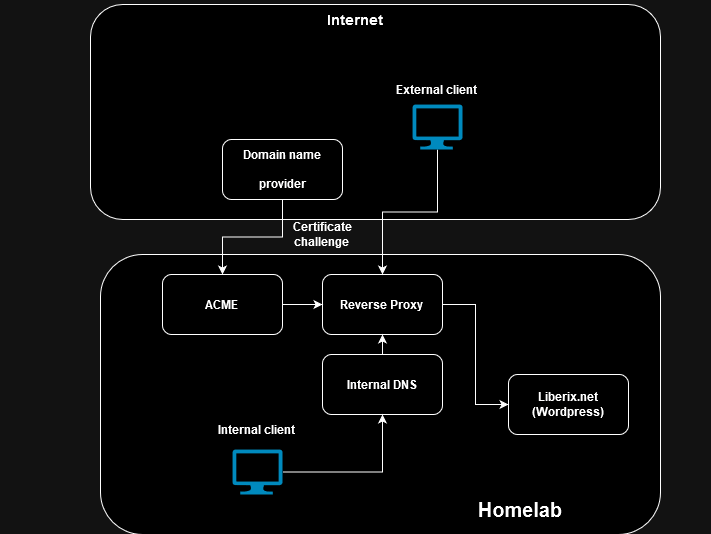
The good news is that a solution such as OPNsense (or pfSense) provides all the tools you will need.
Security
Security should be a priority for your homelab. That includes securing your equipment and your network, but also protecting the data you handle.
The further you go, the more you will probably feel the need to secure your services.
You can go very far with IDS/IPS and tunnels everywhere, but here are some common-sense recommendations for beginners:
Keep your physical and virtual machines up to date
Take regular snapshots or backups of your physical and virtual machines so you can restore them if something goes wrong
Only expose to the Internet what you actually need. For example, I only expose a few services I need outside my home (Plex, Nextcloud, …). Admin interfaces and everything else are only accessible from my network or through a WireGuard VPN on a few of my devices.
Only open the ports you need on your router
Use a reverse proxy with a valid certificate for your services under your domain name
For security, my best source of inspiration is this video by YouTuber Techno Tim, where security is covered from every angle.
https://www.youtube.com/watch?v=Cs8yOmTJNYQ
Documentation and planning
Documenting your setup and projects will help you keep track of your progress and make troubleshooting easier. Take the time to plan your projects and to document both the hardware and the software you use.
A simple Word or Excel file will do.
If you are up for it, the best option is a private GitHub space where you can keep your configuration files, notes and experiments.
Learning and community
Homelabbing is also a learning opportunity. Do not hesitate to experiment and take on projects that push you out of your comfort zone. The homelab community is vast and always ready to help; joining forums and online groups can be a great way to find inspiration and assistance.
Conclusion
Setting up a homelab is an exciting project that offers many opportunities for learning and personal growth. By following these planning steps, you will be well on your way to building a technology environment that meets your needs and aspirations. Happy building!